 SOUND V2
Hear Every
Footstep
Visual sound radar shows enemy direction. Pro EQ boosts footsteps. Loudness limiter protects your ears.
🎯 Sound Radar
👟 Footstep EQ
🔊 Loudness Limit
Download Free
Windows 10/11 • No signup
★★★★★
5.0 Rating
Anti-cheat safe
Why Can't I Hear Footsteps?
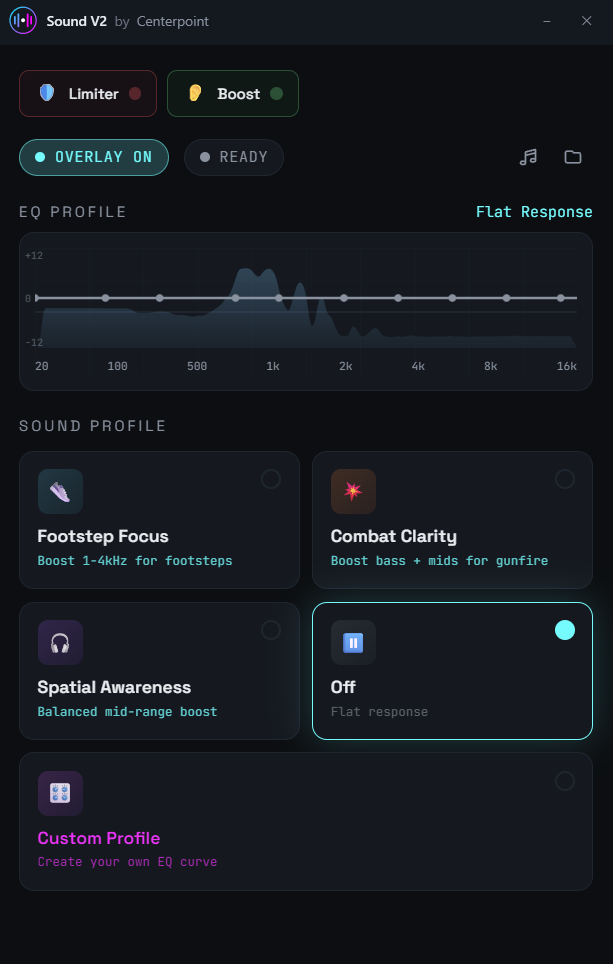
Most games have poor audio mixing. Explosions and gunfire are deafening while crucial footsteps are buried. Sound V2 fixes this by boosting the frequencies where footsteps live (1-4kHz) while limiting ear-blasting peaks.
❌ The Problem
- • Explosions way too loud
- • Enemy footsteps impossible to hear
- • Ear fatigue after long sessions
✓ The Solution
- • Loudness limiter caps explosions
- • EQ boosts footstep frequencies
- • Quiet sound boost for subtle cues
Key Features
Audio tools designed for competitive gaming
Sound Radar Overlay
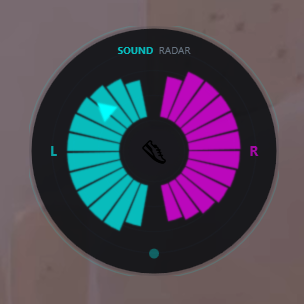
Visual overlay that shows you the direction sounds are coming from in real-time. See enemy footsteps, gunfire, and ability sounds on screen-even if you can't hear them clearly.
- ✓ Always-on-top overlay works with any game
- ✓ 360° directional indicator
- ✓ Customizable size and transparency
- ✓ See sound direction even with audio off
👟
Footstep Focus EQ
Boosts 1-4kHz frequencies where footsteps, reloads, and movement sounds occur. Hear enemies before they see you.
🔊
Loudness Limiter
Caps sudden loud sounds (explosions, gunshots) at -6dB so you can turn up volume without damaging your ears.
📈
Boost Quiet Sounds
Compresses loud sounds while boosting quiet ones. Footsteps become audible while explosions stay controlled.
🎧
Spatial Widening
HRTF-inspired stereo processing for enhanced positional audio. Better left/right separation and directional cues.
📊
Real-time Visualizer
See your audio in real-time with a stereo spectrum analyzer. Always-on-top overlay mode available.
Works With Every Game
Sound V2 processes audio system-wide. It works with any game or application-no per-game setup required.


🎯 Footstep Focus
Boosts 1-4kHz for maximum footstep clarity. Perfect for tactical shooters like Valorant and CS2.
💥 Tactical Mode
Enhances bass and mids for reload sounds and gunfire positioning. Great for action games.
🌐 Spatial Awareness
Balanced mid-range boost for directional audio cues. Ideal for battle royale games.
How It Works
Three simple steps to better gaming audio
1
Download Sound V2
Get it free from the Microsoft Store. Quick install, no complex setup required.
2
Select Your Profile
Choose Footstep Focus, Tactical, or Spatial profile based on your game.
3
Dominate
Hear every footstep, see sound direction on the radar, and win more games.
100% Anti-Cheat Safe
Sound V2 processes audio at the Windows driver level. It never touches game files or memory.
- ✓ VAC Safe - Works with CS2, Dota 2, TF2
- ✓ Vanguard Safe - Works with Valorant
- ✓ EAC Safe - Works with Apex, Fortnite, Rust
- ✓ RICOCHET Safe - Works with Call of Duty
🛡️ How We Stay Safe
Sound V2 is fundamentally different from cheats:
- • No DLL injection - We don't touch game processes
- • No memory reading - We only process audio output
- • No overlays in games - Our visualizer is a separate window
- • Microsoft certified - Available on the official Microsoft Store
Frequently Asked Questions
Everything you need to know about Sound V2
What are the best audio settings to hear footsteps in games?
Is Sound V2 safe to use with Valorant's Vanguard anti-cheat?
Does Sound V2 work with Warzone and other Call of Duty games?
What is the Sound Radar and how does it work?
What's the difference between Sound V2 and Windows Loudness Equalization?
The best settings boost frequencies between 1-4kHz where footstep sounds occur, while reducing low bass that masks them. Sound V2's "Footstep Focus" profile does exactly this. Additionally, enabling the "Boost Quiet Sounds" feature compresses loud explosions while amplifying subtle footsteps. This combination lets you hear enemy movements clearly without being deafened by gunfire.
Yes, 100% safe. Sound V2 processes audio at the Windows driver level. It never interacts with game files, game memory, or game processes. This is the same technology that hardware EQ software (like those from Razer, SteelSeries, or Logitech) uses. Vanguard is designed to detect programs that read/write game memory or inject code-Sound V2 does neither.
Yes! Sound V2 works system-wide, so it enhances audio from any game including all Call of Duty titles (Warzone, MW3, Black Ops 6). The "Footstep Focus" profile is particularly effective in Warzone for hearing enemy footsteps in buildings and compounds. The loudness limiter also helps protect your ears from the game's notoriously loud audio spikes.
The Sound Radar is a visual overlay that analyzes your game audio in real-time and displays a directional indicator showing where sounds are coming from. It works by detecting the stereo balance of sounds-when audio is louder in your left channel, the radar shows activity to the left. This gives you a visual representation of sound direction, helping you spot enemies even when footsteps are subtle or you're in a noisy environment. The overlay is always-on-top and works with any game.
Windows Loudness Equalization is a basic compressor with fixed settings that often introduces noticeable audio artifacts and lag. Sound V2 offers: (1) Gaming-optimized compression with fast attack/release times that preserve audio punch; (2) Frequency-specific EQ that boosts footsteps while controlling bass; (3) Separate limiter and boost controls you can fine-tune; (4) Spatial widening for better positional audio. It's the difference between a hammer and a precision tool.
Ready to Hear Everything?
Download Sound V2 and start dominating with better game audio.

