NEW!

Scope X
Scope in. Miss nothing.
Instantly magnify any part of your screen to reveal critical details in any game.
1 subscriber on the Steam Workshop
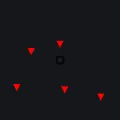
Four short, thick red arms sit around a tight gap with a small dot in the center, very close to the classic setup you see in Counter-Strike. The chunky lines stay easy to track in smoke and chaos, while the dot keeps your taps honest at long range. Made by ruuben, it runs as an overlay through Crosshair X on Steam, so you can drop it into any game you play.

Install Crosshair X from Steam, subscribe to this design on its Workshop page (or inside the app), then select it. Crosshair X draws it at the center of your screen over any game.
Crosshair X is an Xbox Game Bar overlay that runs outside the game process: no hooks, no injection, no game-file changes. It has been in use across Vanguard, VAC, EAC and BattlEye titles for years with no ban reports we know of. Full breakdown: Is Crosshair X safe?.
The crosshair itself is included, like everything on the Crosshair X Workshop. Crosshair X is $3.99 on Steam, and the Microsoft Store version has a free trial so you can test it first.
This crosshair was created and shared by a member of the Crosshair X community on the Steam Workshop. The design belongs to its creator; any referenced games, players, teams or trademarks belong to their respective owners. To report a design, use the report tools on its Steam Workshop page.