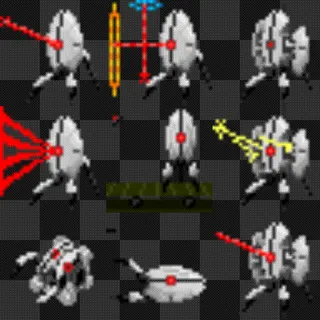
Aperture Science Cyberspace Pointing Apparatus (Portal 2) Mouse Cursor
8 subscribers on the Steam Workshop
Get Mouse X on Steam (Free Demo)
$2.99 once · every Workshop skin included · Windows 10 & 11
View this skin on the Steam Workshop →
Aperture Science Cyberspace Pointing Apparatus (Portal 2) is a animated mouse cursor skin made by Mr Marvell and shared on the Mouse X Steam Workshop in the animated and gaming and retro style. Subscribe to it with Mouse X and it becomes your live Windows pointer. Animated skins play right on the desktop, with no game hooks and almost no memory use.
“Cave Johnson here. Keyboards: Who needs them? Toss it out of the window. Introducing ASCPA: The Aperture Science Cyberspace Pointing Apparatus. The latest and greatest in precision-pointing technology. Using this little…” (Mr Marvell, on the Workshop)
How to get it
- Install Mouse X from Steam. The free demo works too.
- Subscribe to this skin on its Workshop page, or find “Aperture Science Cyberspace Pointing Apparatus (Portal 2)” in the in-app browser.
- Select it in Mouse X and your Windows cursor changes instantly. No hooks, no injection.
Animated

Skin details
- Creator
- Mr Marvell
- Type
- Animated cursor skin
- Source format
- Reactive, GIF
- Published
- Nov 14, 2026
- Last updated
- Nov 14, 2026
- Download size
- 985 KB
- Subscribers
- 8 on the Steam Workshop
- Categories
- Animated cursors, Gaming cursors, Retro cursors, Sci-Fi cursors
More cursors like this Browse all →




Frequently asked questions
How do I install the Aperture Science Cyberspace Pointing Apparatus (Portal 2) cursor?
Install Mouse X from Steam, then subscribe to the skin on its Workshop page (or inside the app). Mouse X downloads it and you can apply it with one click. No .cur files, no Control Panel digging.
Does it work on Windows 11?
Yes. Mouse X supports Windows 10 and 11, uses very little memory and CPU, and doesn’t hook or inject into games or other apps, so it runs quietly alongside everything else.
Is this cursor free?
The skin itself is free, like everything on the Mouse X Workshop. Mouse X is $2.99 on Steam, and the free demo lets you try custom cursors before buying.
This cursor skin was created and shared by a member of the Mouse X community on the Steam Workshop. Artwork belongs to its creator; any referenced characters, names or trademarks belong to their respective owners. To report a skin, use the report tools on its Steam Workshop page.

